Back To Blog
To return items on Temu, open Your Orders, select the order, and choose Return/Refund. Select your items, explain the reason, and follow the instructions for your refund and any required return shipment.
This guide walks U.S. shoppers through eligibility checks, packing, drop-off, and tracking the refund.
Can you return items on Temu?
Yes, most items on Temu can be returned within 90 days of purchase, but exclusions apply. Most electronics have a return window of 45, 60, or 90 days, depending on the seller. The clock starts on the purchase date—not delivery—so check the specific item before assuming you have three full months after it arrives.
The Temu return policy excludes worn, washed, or customer-damaged clothing, including clothing with tags or hygiene stickers removed. Groceries and food are also excluded, alongside some personal-care products, underwear orders, customized products, and free gifts. Check the product details and your order’s return options before preparing a shipment.
Two deadlines matter: the item’s return window and the requirement to send your package back within 14 days of submitting the request. Do not treat those 14 days as an extension beyond the item’s return window. Start early enough to complete both the request and the return shipment on time.
Prepare your items and order information
Before starting, gather everything you might need so you can complete the request without guessing. Keep the items separate from products you intend to keep, and avoid removing any remaining tags while you check eligibility.
Use this preparation checklist:
- Find the correct order: Match the item, size, color, and quantity against your purchase record.
- Gather accessories: Put cables, attachments, and other included parts beside the item so nothing gets overlooked.
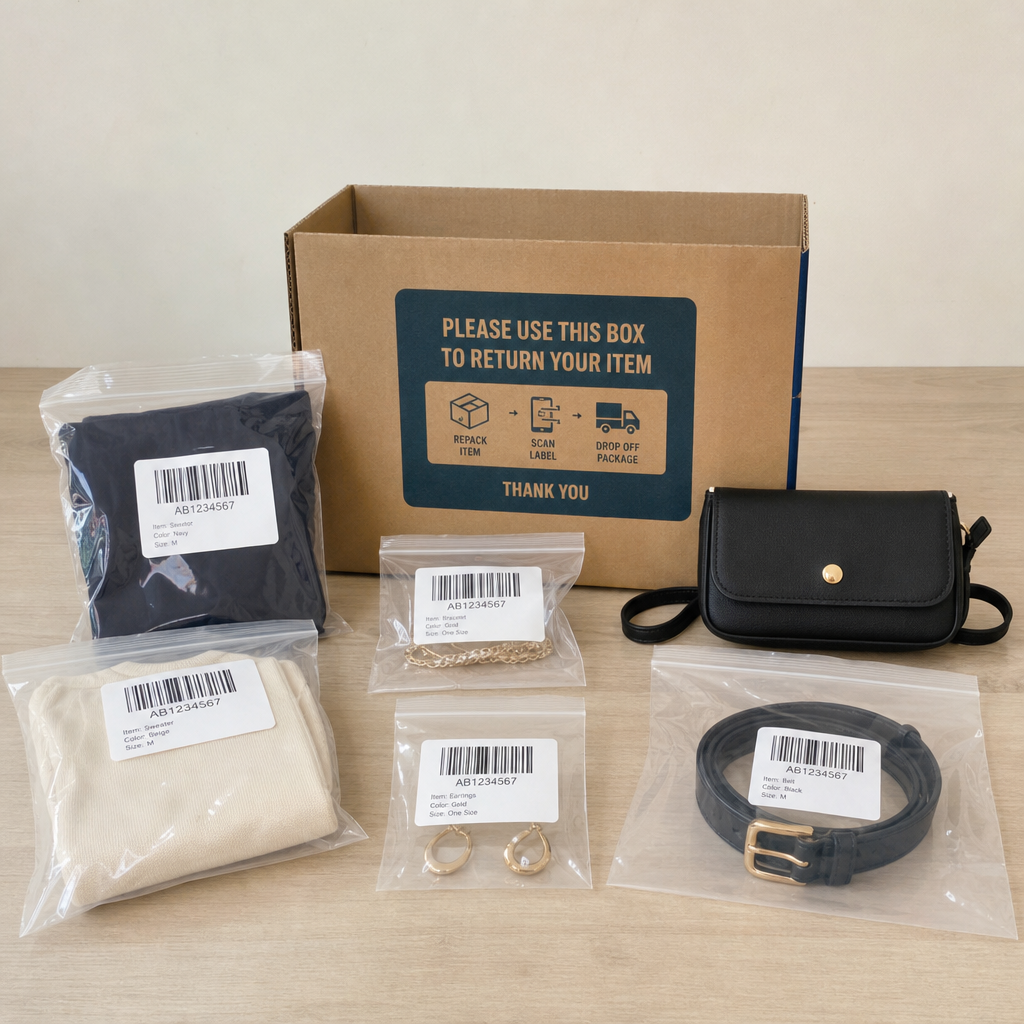
- Keep identifying packaging: Save each item’s original barcode when available; Temu uses it to identify returns.
- Document the problem: Take clear photos if an item arrived damaged, incorrect, or different from its description.
- Review the whole order: Decide whether other eligible items need returning before sending the first package.
For your own records, photograph the items and accessories before packing. Save those pictures with the request confirmation and eventual drop-off receipt until the refund is settled.
Complete your Temu return step by step
Open the correct order.
- Sign in to the Temu app or website using the account associated with your purchase. Open Your Orders, locate the relevant purchase, and select Return/Refund. Check the product thumbnail and order details carefully if you have bought similar items more than once.
- If you purchased without a Temu account, Temu’s policy directs you to Save your Order in the order email to make a return. Keep that email handy rather than creating an unrelated account and expecting the purchase to appear automatically.
Select the items and explain the reason.
- Choose each item you want to return and the reason that accurately describes the issue. Confirm receipt of the package if prompted, then add requested photos or comments. Review the information before moving to the next screen.
- Be specific in your explanation. For example, describe the broken part rather than writing only “damaged,” or identify the color received versus the color ordered. Keep the description factual and make sure any photographs show the actual issue.
Choose the refund destination.
- Where offered, select either your original payment method or Temu credit. Read the selection carefully before submitting; faster credit is not the same as money returned to your payment account.
- Temu credit has no expiration date, but it typically cannot be redeemed for cash, and processed credit refunds generally cannot be reversed. Choose your original payment method if your priority is getting the money back rather than using it for another Temu purchase.
- If Temu explicitly says the item does not need returning, follow that outcome and submit your refund request. Do not assume that another order will receive the same treatment: follow the instructions for this particular request.
Select the return method and save the instructions.
- If a physical return is required, choose an available return method and submit the request. Temu will supply a return label, return code, or both, depending on the method. Save the confirmation so you can check the handover instructions before leaving home.
- To retrieve a generated label later, go to Your Orders → Returns → Print Return Label. Download and print it if your selected method requires a printed label. A return code is not automatically permission to arrive with unpacked items; read the selected method’s instructions.
Pack the selected items securely.
- For a standard packaged return, include the items covered by the request and their original barcodes. If an item’s barcode is missing, Temu instructs shoppers to package that item individually in a transparent bag before placing it in the return parcel. Missing a barcode does not mean you should abandon the request.
- Use protective material around fragile items, keep accessories together, and check the contents against your request before sealing. If you selected Happy Returns, Temu says packing is not required; follow the instructions shown for that option instead.
Hand over the return and retain proof.
- Attach the supplied label when required, or bring the return code as instructed. Use the carrier or drop-off service assigned to your request, rather than choosing a different service simply because its locati0n is closer. Send the return within the required deadline.
- Ask for a receipt or electronic handover confirmation and save the tracking number. As a practical check, compare the receipt with your saved return instructions before leaving. Keep your records until you have confirmed that the refund reached the destination you selected.
Check return shipping costs before submitting
The first return of one or more eligible items from each order is generally free within the applicable return window. That means the benefit applies per order, not separately to every item. Later separate returns from the same order can carry a $7.99 shipping fee plus applicable tax, deducted from the refund.
Whenever possible, inspect everything from the order before using that first return. If you have already submitted a request but have not shipped it, Temu’s help instructions say to follow the return-details page to add eligible items using the same label. Do not simply put unregistered extras in the box.
How long does the Temu refund process take?
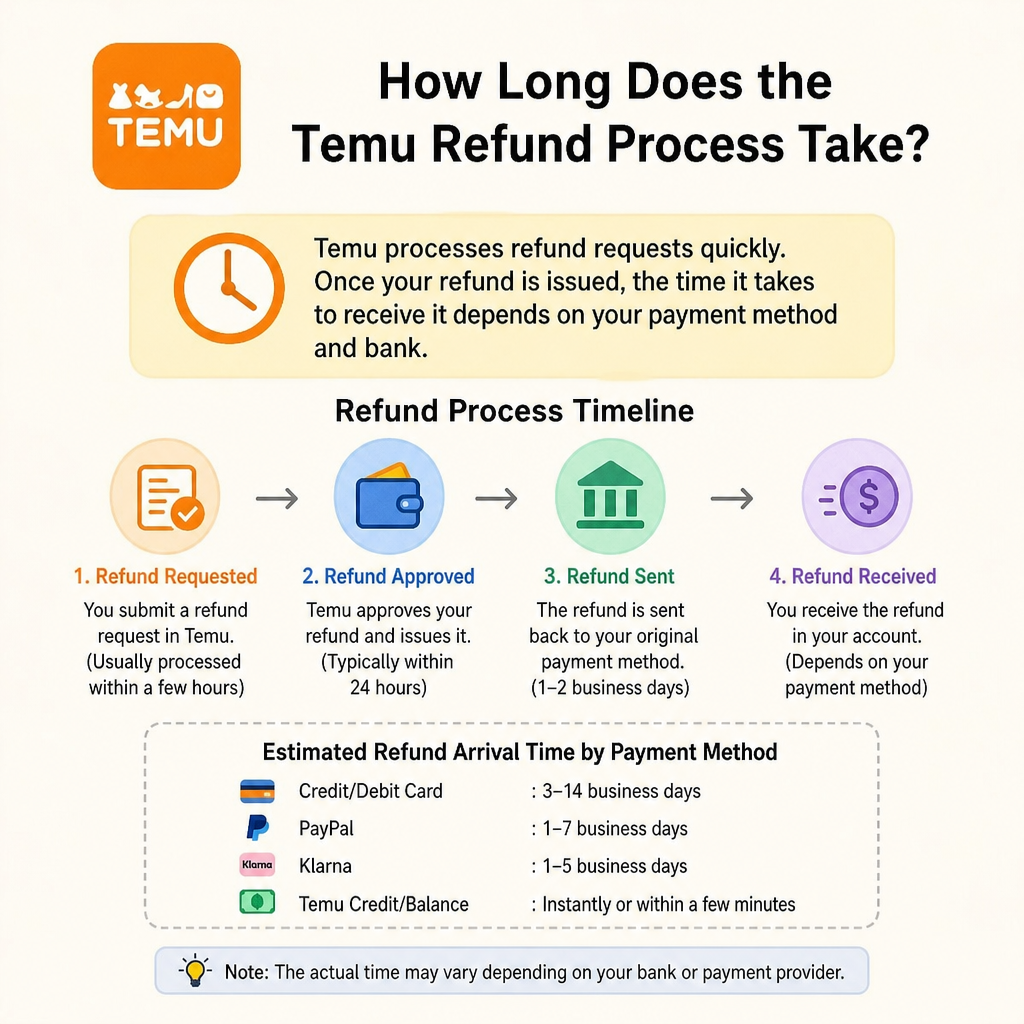
For standard returned items, Temu initiates the refund after receiving them and completing a quality inspection. After issuance, refunds to the original payment method generally take 5–14 business days, sometimes up to 30 days, depending on the financial institution. Shipping time and inspection come before that payment-processing period.
Temu credit is faster: its support guidance says the credit typically appears within three minutes once issued. That does not mean every return is approved within three minutes of submission. Check whether your status shows the request, return delivery, or actual refund issuance.
Track progress through the order details and watch for Temu’s email, text, or push notifications. If Temu confirms issuance but the money has not appeared, your financial institution can help check the payment’s progress.
What should you do if the return stalls?
If the label is missing, revisit Your Orders → Returns and look for the download option. If a barcode is unavailable, follow the transparent-bag instructions rather than substituting another product’s barcode. For a missing refund after inspection, contact Temu with the order number, return confirmation, tracking details, and your handover receipt.
Keep your message focused on the stage that needs attention: accessing the label, confirming receipt, completing inspection, or locating an issued refund. Ask support to identify the next action required from you. This keeps the conversation practical and gives you a clear record of what to do next.
Frequently Asked Questions Related to Returning Items on Temu
What is the Temu return policy?
Most items can be returned within 90 days of purchase, but exclusions apply, such as worn or washed clothing, groceries, and customized products. Specific categories like electronics have varied return windows.
How do I initiate a return on Temu?
To return an item, sign in to your Temu account, navigate to Your Orders, select the order you wish to return, and click on Return/Refund to follow the instructions.
How long does it take to receive a refund after returning an item to Temu?
Refund processing typically takes 5-14 business days after Temu receives the returned items and completes a quality inspection, although it can take up to 30 days depending on your financial institution.
Are there any costs associated with returning items to Temu?
The first return for eligible items from each order is usually free within the return window. Subsequent returns may incur a fee of $7.99 plus tax.
What should I do if my return request stalls or the refund is missing?
Contact Temu with your order number, return confirmation, tracking details, and handover receipt if there are issues accessing your return label, or if a refund has not appeared after inspection.